What to Do When a GLOW COA Doesn't Clearly Match Your Batch
A certificate can be genuine and still not obviously belong to the pen in front of you. Here is how to check the batch match, and what to ask when it stays unclear.
You have a GLOW pen on the bench, a Certificate of Analysis open on screen, and something doesn't quite line up. Perhaps the batch number on the report differs by a character from the label, or the report describes the sample in words you weren't expecting. Before anyone writes "COA checked" in the file, the GLOW COA batch match needs settling properly.
Two separate questions tend to get tangled here. One is whether the report is genuine. The other is whether it applies to the material you actually hold. A real report for a different batch answers the first and not the second, so it pays to work through them one at a time.
Below are the checks worth making, the question to send if the match stays unclear, and a simple way to record the outcome so the next person isn't left guessing.
Start with the label, not the report
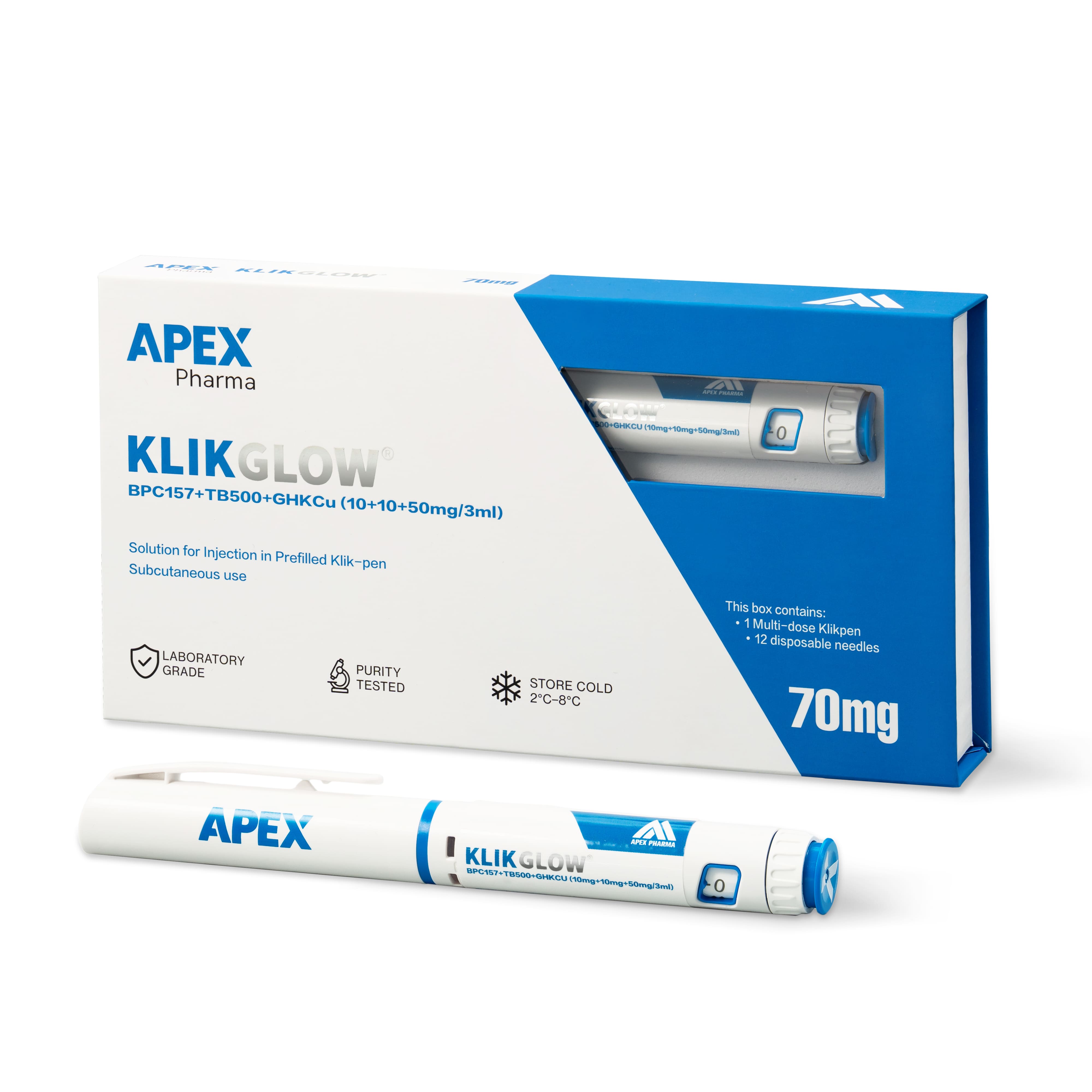
The label is your fixed reference point. A GLOW pen is labelled KLIKGLOW and carries a batch number. Write that number down exactly as printed, including any letters, dashes or leading zeros, before you open a report. That way you aren't unconsciously reading the label to fit the document.
Then check the stated contents. GLOW is BPC-157 10mg, TB-500 10mg and GHK-Cu 50mg in a single 3ml pen, 70mg in total. If the label in your hand says something different, you have a product question rather than a paperwork one, and it should be raised first.
Compare the report field by field
Open the report from the Certificates of Analysis page or the product page, where one is available for that batch. Rather than skimming for a reassuring headline figure, compare specific fields:
- Batch or lot number matches the label character for character
- Sample description refers to the finished three-component blend, not to one ingredient on its own
- Components listed include BPC-157, TB-500 and GHK-Cu
- Report date is plausible for the batch you received
- Completeness means you are reading the full report, not a cropped image or a one-line summary
- Version is noted if more than one report exists for the same batch
If every item lines up, the match is made and you can record it. If one doesn't, the next section covers the usual causes.
Why a match can look unclear
Formatting differences
Batch numbers sometimes appear with different separators, spacing or letter case on a label and in a report. A formatting difference isn't necessarily a different batch, but don't assume either way. Ask for confirmation rather than editing one record so the two agree.
A report covering a single component
A report on one ingredient can be useful background, but it doesn't describe the blended pen as supplied. File it as related information, not as the certificate for your batch.
No report for this batch yet
CLOVA publishes reports where one is available, and not every batch will have one at the moment you look. A missing report is a gap to note in your file. It isn't evidence of a problem with the material.
Send one precise question
A vague message such as "is this COA right?" tends to get a vague reply. A better enquiry gives the batch number from the label, names the report you compared it with and states the exact mismatch. For example: "Our KLIKGLOW pen shows batch [number]. The report we found lists [number]. Can you confirm whether this report applies to our batch, or whether a separate report exists?"
When the reply arrives, read it for what it actually settles. Confirmation that the difference is only formatting resolves the match. A note that a report is being prepared resolves nothing yet, and your record should say so.
Record the outcome so it holds up later
Keep the original report unedited and add your own note beside it. The note should say which label batch you checked, which report you compared it with, what didn't match, what you asked and what you were told. If the question is still open, say that plainly.
Be precise about scope, too. GLOW is supplied for research use only, and a confirmed match simply tells you which report describes the composition of that batch. It doesn't carry over to future batches, and it doesn't stretch the report beyond what was actually measured.
Frequently asked questions
Does every GLOW batch have a COA?
No. Reports are published on the COA page and on product pages where one is available for that batch. If you can't find one for the batch on your label, ask CLOVA whether a report exists or is expected, and note the gap in your file.
Can I correct an obvious typo in a batch number myself?
It's better not to. Leave the label record and the report exactly as they are, then add a note explaining the difference and the confirmation you received. Anyone reviewing the file later can then see precisely what was compared.
What if the batch matches but the sample name is unclear?
Ask CLOVA how the sample described in the report relates to the KLIKGLOW product. Keep the report's own wording in your notes rather than renaming the sample to match the listing, so the original description stays visible.